 Rewordz
The best vocabulary apps in 2026: pros, cons and prices of 8 popular apps
The best vocabulary app depends on how much of the work you want to do. Anki is free and gives you total control, if you make every card yourself. Duolingo and Drops pick the words and write everything for you, but the words you meet in your own life have nowhere to go. Memrise, Lingvist, Clozemaster and LingQ now sit in between. We compared eight popular apps on what research says makes words stick, and on what a year costs: from nothing to $119.99.

· 15 min read
The short answer
There is no single best app, because each one splits the work differently. Pick the one that matches what you're after:
 Anki if you want full control for free and don't mind making your own cards.
 Quizlet to turn a class word list into flashcards in minutes.
 Duolingo for a free, guided start in a new language.
 Drops for complete beginners with five minutes a day.
 Memrise to hear words from native speakers, with your own word lists on top.
 Lingvist to learn the most frequent words first, each one in a sentence.
 Clozemaster once you're past the basics, for words in context in 50+ languages.
 LingQ to collect words from the articles, books and videos you choose.
 We make Rewordz, a vocabulary app for the words you run into yourself, reviewed from your home screen. It isn't out yet, and we hold it to the same criteria at the end.
What makes a vocabulary app work
Memory research points to five things. We used them to compare the apps, and each one links to a longer article.
- It makes you recall the word. Trying to remember a meaning before you see it builds memory; reading it again mostly doesn't. In a 2008 study, students who kept testing themselves on Swahili words remembered about 80% of them a week later, against about a third for students who kept studying them. More in how to memorize vocabulary.
- It spaces the reviews. Reviews spread over growing gaps beat the same reviews crammed together (Cepeda et al., 2006). All eight apps schedule reviews in some way, so this rarely decides between them. See spaced repetition intervals.
- It shows the word in use. A translation is the fastest way to a meaning, and sentences show how the word behaves. In a 1996 study, learners recalled more words learned with translations, but weaker learners then struggled to use them in sentences, so the author recommended both.
- The words matter to you. A word you'll meet again gets a free review every time you do. Making the card yourself helps too: in six experiments, people who wrote their own flashcards remembered more two days later than people who studied premade ones. The cost is time.
- You keep coming back. Any method fails once you stop. New daily habits took a median of 66 days to become automatic in one study, and the weak link is often remembering to open the app, as we explain in vocabulary widgets.
Who picks the words, who writes the cards
Most differences between these apps come down to two jobs: choosing which words to learn, and writing the card for each one (the translation, an example, the audio). Either you do them or the app does.
Total control, and writing a card helps you remember it. It takes the most time.
- Anki
- Quizlet
Your own words with less work, as long as the app writes them well.
- Rewordz
- Lingvist custom decks
- Memrise word lists
- Clozemaster Pro
- LingQ
Nothing to set up, but the words you meet elsewhere have nowhere to go.
- Duolingo
- Drops
- Lingvist
- Memrise
- Clozemaster
Doing both jobs yourself gives you the most control, plus the memory boost of writing the card. It also takes the most time, and not everyone sticks with it. In a semester-long study, beginning Spanish students who were asked to use Anki did better at the end of the semester the more days they used it, but they were reluctant to use it and reported low enjoyment (Seibert Hanson & Brown, 2020). Letting a course do both jobs costs you nothing, but the word you saw on a menu, in a series or at work has nowhere to go. The middle group tries to keep your words and drop the busywork.
Features at a glance
All eight apps schedule reviews with some form of spaced repetition, so the table leaves that out and shows what does differ.
| App | Add your own words | Writes the card for your words | Words in sentences | Audio | Review on the home screen | Free plan |
|---|---|---|---|---|---|---|
| Anki |
Yes | Noyou write it | Partly:if you add them | Partly:add it, or a computer voice | No | Yes:iPhone app $24.99 |
| Quizlet |
Yes | Partly:AI, from your notes | Partly:if you add them | Partly:computer voice, 29 languages | No | Yes:ads, limits |
| Duolingo |
No | n/a | Yes | Yes | No | Yes:ads, limited hearts |
| Drops |
No | n/a | Partly:mostly single words | Yes | No | Partly:time limit |
| Memrise |
Yes:word lists | Partly:audio and examples where available | Yes | Yes | No | Partly:limited |
| Lingvist |
Yes:custom decks | Yes | Yes | Yes | No | No:14-day trial |
| Clozemaster |
Partly:Pro | Partly:finds sentences | Yes | Partly:30+ languages | No | Yes |
| LingQ |
Yes:from what you read | Partly:your word in its sentence | Yes | Yes | No | Partly:20 saved words |
| Rewordz |
Yes | Yes | Yes:a two-line chat | Partly:your phone's voice | Yes | Partly:without the AI |
Yes Partly No. The widgets of Duolingo, Drops and Clozemaster show your streak, and AnkiDroid's show the cards due; none lets you answer on the home screen. Checked in November 2026.
What a year costs
Anki is free, except on iPhone. Paid plans run from $35.99 a year for Quizlet Plus to $119.99 for LingQ Premium, and most cost $60 to $100. Every paid app here also sells a monthly plan, which costs more over a year: Memrise's $24.99 a month adds up to $299.88, almost five times its yearly price.
- Anki
Free - Quizlet Plus
$35.99 - Rewordz Pro
$49.99 - Memrise Pro
$61.99 - Drops Premium
$69.99 - Lingvist
$79.99 - Clozemaster Pro
$79.99 - Duolingo Super
$95.99 - LingQ Premium
$119.99
See the prices in a table
| App and plan | Per year | Per month | Price from |
|---|---|---|---|
| Anki | Free | Free | AnkiWeb; iPhone app $24.99 once |
| Quizlet Plus | $35.99 | $7.99 | Website |
| Rewordz Pro | $49.99 | $4.99 | Website, at launch |
| Memrise Pro | $61.99 | $24.99 | US App Store |
| Drops Premium | $69.99 | $11.00 | Website |
| Lingvist | $79.99 | $9.99 | US App Store |
| Clozemaster Pro | $79.99 | $12.99 | US App Store |
| Duolingo Super | $95.99 | $12.99 | US App Store |
| LingQ Premium | $119.99 | $14.99 | US App Store |
The apps, one by one
Anki: full control, if you make the cards
Anki is a free, open-source flashcard program, widely used by medical students and language learners. You write the cards, or download one of thousands of shared decks, and Anki schedules each one. Since version 23.10 it can use FSRS, a scheduler that estimates each card's memory from your review history and brings it back when your predicted recall falls to a target you set.
- Free on Android (AnkiDroid), Windows, Mac, Linux and the web, with free sync.
- A scheduler you can see and tune, down to the recall rate you aim for.
- Any language and any card layout, with images, audio and add-ons.
- Making your own cards helps you remember them.
- You write every card, or trust someone else's deck, and that takes time.
- A steep learning curve: note types, deck options, add-ons.
- The iPhone app, AnkiMobile, costs $24.99.
- Effective but not much fun, according to the Spanish students above.
- AnkiDroid's widgets show the cards due and open a deck; reviews happen in the app.
- Price
- Free; $24.99 once on iPhone
- Free plan
- Everything
- Languages
- Any
- Platforms
- Android, iPhone, computers, web
apps.ankiweb.netApp StoreGoogle Play
Quizlet: the quickest way to turn a list into flashcards
Quizlet is the flashcard app most students know. You type terms and definitions, or reuse one of the many sets other users have shared, then study with flashcards, Learn mode, practice tests and games, and Quizlet brings back what you need to review. Newer AI features build a set from your notes or a recorded lecture. It's made for every school subject, so a card is a term and a definition, with no example sentence unless you add one.
- The fastest way to turn a word list into flashcards, on the web, iPhone and Android.
- Shared sets for almost any textbook or class.
- Many ways to study: flashcards, Learn, practice tests and matching games.
- Text-to-speech audio in 29 languages, 10 of them for Plus subscribers only.
- No example sentences or context unless you write them.
- Shared sets vary in quality, and their mistakes get learned too.
- The free plan has ads and limits. Even Quizlet Plus caps Learn at 20 rounds a month; unlimited Learn takes Plus Unlimited, $44.99 a year.
- Plans cost more in the app than on the website.
- Price
- $35.99 a year or $7.99 a month (Plus)
- Free plan
- Yes, with ads and limits
- Languages
- Any; audio in 29
- Platforms
- Web, iPhone, Android
quizlet.comApp StoreGoogle Play
Duolingo: a free, guided course, with no room for your words
Duolingo is by far the most popular language app, with over 500 million downloads on Google Play. It teaches through short, game-like lessons in 40+ languages, with streaks, leagues and characters designed to bring you back every day. Vocabulary comes with the course: you learn the words Duolingo picked, in its sentences.
- Every course is free.
- Built to bring you back: streaks, leagues, reminders, and a home-screen widget that shows your streak. Duolingo reports that learners with the widget stay far better, even after accounting for the fact that more committed learners are the ones who add it.
- A full course, with reading, listening, speaking and writing.
- In a study by Duolingo researchers, 225 US adults who finished the beginner Spanish or French course read and understood the language about as well as university students after four semesters.
- You can't add your own words.
- You don't choose which words come back, or when.
- The free plan has ads and a limited number of hearts for mistakes.
- Super is $95.99 a year in the US App Store, which also lists other prices for it.
- The widget reminds you of your streak; it doesn't quiz you.
- Price
- $95.99 a year or $12.99 a month (Super)
- Free plan
- Every course, with ads
- Languages
- 40+
- Platforms
- Web, iPhone, Android
duolingo.comApp StoreGoogle Play
Drops: five-minute visual games for beginners
Drops teaches vocabulary through quick games: words come with an illustration and a native speaker's recording, and you match, swipe and spell your way through themed lists in short sessions. It has belonged to Kahoot! since 2020 and covers 55+ languages, including Hawaiian and Māori.
- Fun and fast, and friendly to complete beginners, even in Japanese, Korean or Arabic.
- Native speaker audio and pictures to remember words by.
- 55+ languages, some of them rare in apps.
- A widget on iPhone and Android reminds you to keep your streak.
- Mostly single words and short phrases, so you see little of how words work in sentences. Grammar lessons exist only for English, Spanish, German and European Portuguese.
- Fixed themed lists: you can't add your own words.
- The free plan limits your learning time.
- Price
- $69.99 a year or $11 a month (Premium)
- Free plan
- Yes, time-limited
- Languages
- 55+
- Platforms
- iPhone, Android
languagedrops.comApp StoreGoogle Play
Memrise: native speakers on video, and your own word lists
Memrise started as a site of user-made flashcard courses and is now a course app built around short videos of native speakers, with AI conversation partners. In 2026, user-made word lists came back into the app: you can build a list of your own words and study it like a course, with Memrise's spaced reviews, plus audio and example sentences where its library has them. Mems, its memory tricks, returned in May 2026 with AI-made images.
- Native speakers on video show how words really sound.
- Your own word lists, with audio from more than 611,000 recordings and examples where available.
- AI conversation practice to put your words to use.
- Memrise lists 149 languages, counting user-made word lists.
- The free plan limits lessons, videos and conversations, and shows ads.
- The priciest monthly plan here: $24.99 a month in the US App Store.
- Features come and go: community courses left the app in 2024, and word lists only returned in 2026.
- Audio and examples for your own words depend on what's in its library.
- Price
- $61.99 a year or $24.99 a month (Pro)
- Free plan
- Limited
- Languages
- 149, with word lists
- Platforms
- Web, iPhone, Android
memrise.comApp StoreGoogle Play
Lingvist: the most useful words first, in sentences
Lingvist is a vocabulary course. It estimates your level, then teaches the most useful words you don't know yet, each as a gap to fill in a sentence, while an algorithm decides when each word comes back. Custom decks turn a list of words or a text you upload, such as a textbook chapter or a Wikipedia article, into a deck with sentences for each word.
- Every word comes in a sentence and you type it, so every card makes you recall.
- Frequent, useful words first.
- Custom decks from your own words or texts, with the sentences written for you.
- Audio you can slow right down.
- No free plan, only a 14-day trial with the yearly plan.
- 15 languages, all taught from English, plus English for speakers of other languages.
- Mostly vocabulary, with short grammar tips.
- Price
- $79.99 a year or $9.99 a month
- Free plan
- 14-day trial
- Languages
- 15, from English
- Platforms
- Web, iPhone, Android
lingvist.comApp StoreGoogle Play
Clozemaster: thousands of sentences for intermediate learners
Clozemaster drills vocabulary with fill-in-the-blank sentences: you see a sentence with one word missing and pick or type it, starting with the most frequent words. Most sentences come from Tatoeba, a volunteer-built collection of translated sentences. It's aimed at learners past the basics (A2 to C1) and covers 50+ languages in more than 170 language pairs. Pro subscribers can build their own collections, for example by pasting a word list and letting Clozemaster pick sentences that use those words, and since 2026 a Quick Capture widget saves words you come across, typed in either language.
- Every word in a sentence, with thousands of sentences per language.
- 50+ languages, including rarer ones such as Welsh, Yiddish or Toki Pona.
- The core game is free; Pro adds listening, offline play and your own review intervals.
- Widgets show your streak and how many sentences are ready for review.
- Not for beginners: the sentences assume some grammar.
- Sentences from a volunteer database vary in quality.
- Your own words need Pro, and get sentences from Clozemaster's collection unless you write them yourself.
- Price
- $79.99 a year or $12.99 a month (Pro)
- Free plan
- Yes
- Languages
- 50+
- Platforms
- Web, iPhone, Android
clozemaster.comApp StoreGoogle Play
LingQ: words from what you read and watch
LingQ turns content you choose into lessons: articles, ebooks, podcasts, YouTube videos. You tap a word you don't know to see its meaning and save it, with the sentence you found it in, as a "LingQ", and saved words come back in spaced reviews. The polyglot Steve Kaufmann co-founded it, and it covers more than 50 languages.
- Words come from content you picked, in the sentence where you met them.
- Import almost anything, from web articles to ebooks and videos.
- 50+ languages, with AI voices to read lessons aloud.
- It counts the words you know as you read.
- Made for learners who read a lot; beginners can feel lost.
- The free plan stops at 20 saved words.
- Reviews are a side feature of a reading app.
- The most expensive yearly plan here.
- Price
- $119.99 a year or $14.99 a month (Premium)
- Free plan
- 20 saved words
- Languages
- 50+
- Platforms
- Web, iPhone, Android
Where Rewordz fits
Rewordz is our app, so weigh this part accordingly. It sits in the middle group: you choose every word, and the app writes the card. You type a word you came across, in the language you're learning or in your own, and Rewordz writes a translation and a two-line conversation using it, between two emoji characters in a scene of colour and emojis, with a twist to make it stick. The research behind that is in emotion and memory.
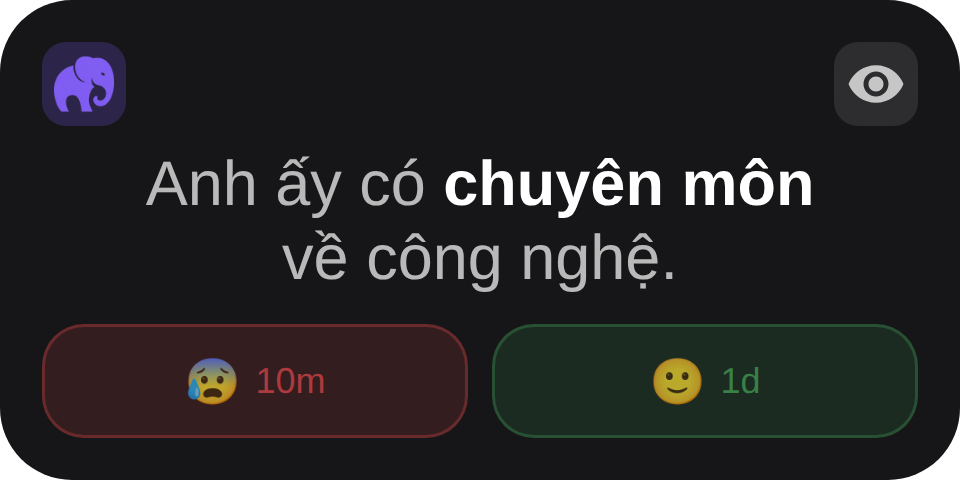
The word then comes to your home screen. The widget shows the word that's due on its own. You decide whether you know it, tap it to see its conversation with the word in bold, tap the conversation to see it in your language, and grade it with one tap. Know it, and it climbs a ladder from 1 day to 6 months; don't, and it's back in 10 minutes. A speaker button reads the word, or the conversation, aloud with your phone's own text-to-speech voices.
- Any word you meet, typed in either language, becomes a full card in seconds.
- Each word comes in a short, funny conversation, with a scene to remember it by.
- You review and grade on the home screen, without opening an app.
- Every conversation can be read aloud, from the widget too.
- 21 languages, in any pair, such as Vietnamese from French.
- Free to use; Pro, which writes the cards, is $4.99 a month or $49.99 a year.
- Not out yet: invites go out in order from the waitlist.
- Vocabulary only: no lessons, grammar, listening or speaking practice.
- Audio is your phone's computer voice, not recordings of native speakers.
- No ready-made lists: you bring every word.
- A fixed ladder, not an adaptive scheduler like Anki's FSRS.
- An AI writes the cards, so one can be wrong; you can edit it or have it rewritten.
- On the free plan, you write the translations yourself: the AI takes Pro.
- Price
- $49.99 a year or $4.99 a month (Pro)
- Free plan
- Yes, without the AI
- Languages
- 21, any pair
- Platforms
- iPhone, Android (coming soon)
You don't have to pick one
Many learners pair two kinds of app: one that brings new material, and one that keeps the words they want. A course such as Duolingo, Babbel or Drops gives structure, and LingQ, a podcast or a series gives real input. A flashcard app such as Anki, Quizlet or Rewordz then holds the words worth keeping, wherever they came from: the ones you'll meet again, from your work, your hobbies or the series you're watching (see choosing words).
If you mostly want words on your home screen, word-of-the-day apps do that too. Vocabulary shows English words on a widget and on the lock screen, and WordBit shows a word each time you open your Android phone. Both show words picked for you, and seeing a word isn't the same as recalling it, as we explain in word of the day or flashcard widget.
Frequently asked questions
What is the best app to learn vocabulary?
It depends on how much of the work you want to do. Anki is the best free option if you are willing to make your own cards. Duolingo and Drops are the easiest start, but you can't add your own words. Memrise, Lingvist, Clozemaster and LingQ let you add words and help write the cards, mostly on paid plans. Rewordz writes the whole card for any word you add and quizzes you on your home screen; it is coming soon.
Is Anki better than Quizlet for learning a language?
For long-term memory, Anki is usually the better choice: it schedules every card with spaced repetition you can tune, works with any language and is free on Android, computers and the web. Quizlet is quicker for turning a class list into flashcards and has more study games, but its free plan has ads and limits, and Quizlet Plus caps Learn mode at 20 rounds a month.
Can you add your own words to Duolingo?
No. Duolingo teaches the words in its courses, inside its own sentences. To keep the words you meet elsewhere, pair it with an app that takes your own words, such as Anki, Quizlet, Memrise word lists, Lingvist custom decks, LingQ or Rewordz.
Which vocabulary apps are free?
Anki is free on Android, Windows, Mac, Linux and the web; the iPhone app costs $24.99 once. Every Duolingo course is free, with ads. Quizlet, Clozemaster, Memrise, Drops and LingQ have free plans with limits, and Lingvist offers a 14-day trial. Rewordz, coming soon, has a free plan without its AI features.
Is there a vocabulary app that quizzes you on your home screen?
Few do. The widgets of Duolingo, Drops and Clozemaster show your streak, AnkiDroid's show the cards due, and word-of-the-day widgets show a word picked for you. Rewordz is built around a widget that shows your own words inside a short conversation and lets you grade each one with a tap, on a spaced repetition schedule. It is coming soon to iPhone and Android.
Sources
Research
- Karpicke, J. D., & Roediger, H. L. (2008). The critical importance of retrieval for learning. Science, 319(5865), 966–968. doi:10.1126/science.1152408
- Cepeda, N. J., Pashler, H., Vul, E., Wixted, J. T., & Rohrer, D. (2006). Distributed practice in verbal recall tasks: A review and quantitative synthesis. Psychological Bulletin, 132(3), 354–380. doi:10.1037/0033-2909.132.3.354
- Prince, P. (1996). Second language vocabulary learning: The role of context versus translations as a function of proficiency. The Modern Language Journal, 80(4), 478–493. doi:10.1111/j.1540-4781.1996.tb05468.x
- Pan, S. C., Zung, I., Imundo, M. N., Zhang, X., & Qiu, Y. (2023). User-generated digital flashcards yield better learning than premade flashcards. Journal of Applied Research in Memory and Cognition, 12(4), 574–588. doi:10.1037/mac0000083
- Lally, P., van Jaarsveld, C. H. M., Potts, H. W. W., & Wardle, J. (2010). How are habits formed: Modelling habit formation in the real world. European Journal of Social Psychology, 40(6), 998–1009. doi:10.1002/ejsp.674
- Seibert Hanson, A. E., & Brown, C. M. (2020). Enhancing L2 learning through a mobile assisted spaced-repetition tool: An effective but bitter pill? Computer Assisted Language Learning, 33(1–2), 133–155. doi:10.1080/09588221.2018.1552975
- Jiang, X., Rollinson, J., Plonsky, L., Gustafson, E., & Pajak, B. (2021). Evaluating the reading and listening outcomes of beginning-level Duolingo courses. Foreign Language Annals, 54(4), 974–1002. doi:10.1111/flan.12600
App facts and prices, checked on November 11, 2026
- Anki Manual. Deck options: FSRS. AnkiMobile and AnkiDroid listings on the App Store and Google Play.
- Quizlet. Quizlet Plus plans and audio playback.
- Duolingo. How we developed our addictive and delightful widget (2023), and the US App Store listing.
- Drops. Drops Premium and the Drops widget.
- Memrise. Changes to the Memrise app, custom word lists, and the US App Store listing.
- Lingvist. Pricing, the Google Play listing and the US App Store listing.
- Clozemaster. FAQ, Clozemaster Pro and the US App Store listing.
- LingQ. What is the LingQs limit? and the US App Store listing.
App names and icons belong to their owners and are shown only to identify each app.